








 Zendesk Integration
 Bring every marketplace conversation into Zendesk
Connect Amazon, eBay, Mirakl, Walmart, and more — marketplace tickets land in Zendesk automatically, with full order context, ready for your team to action.
Connects with









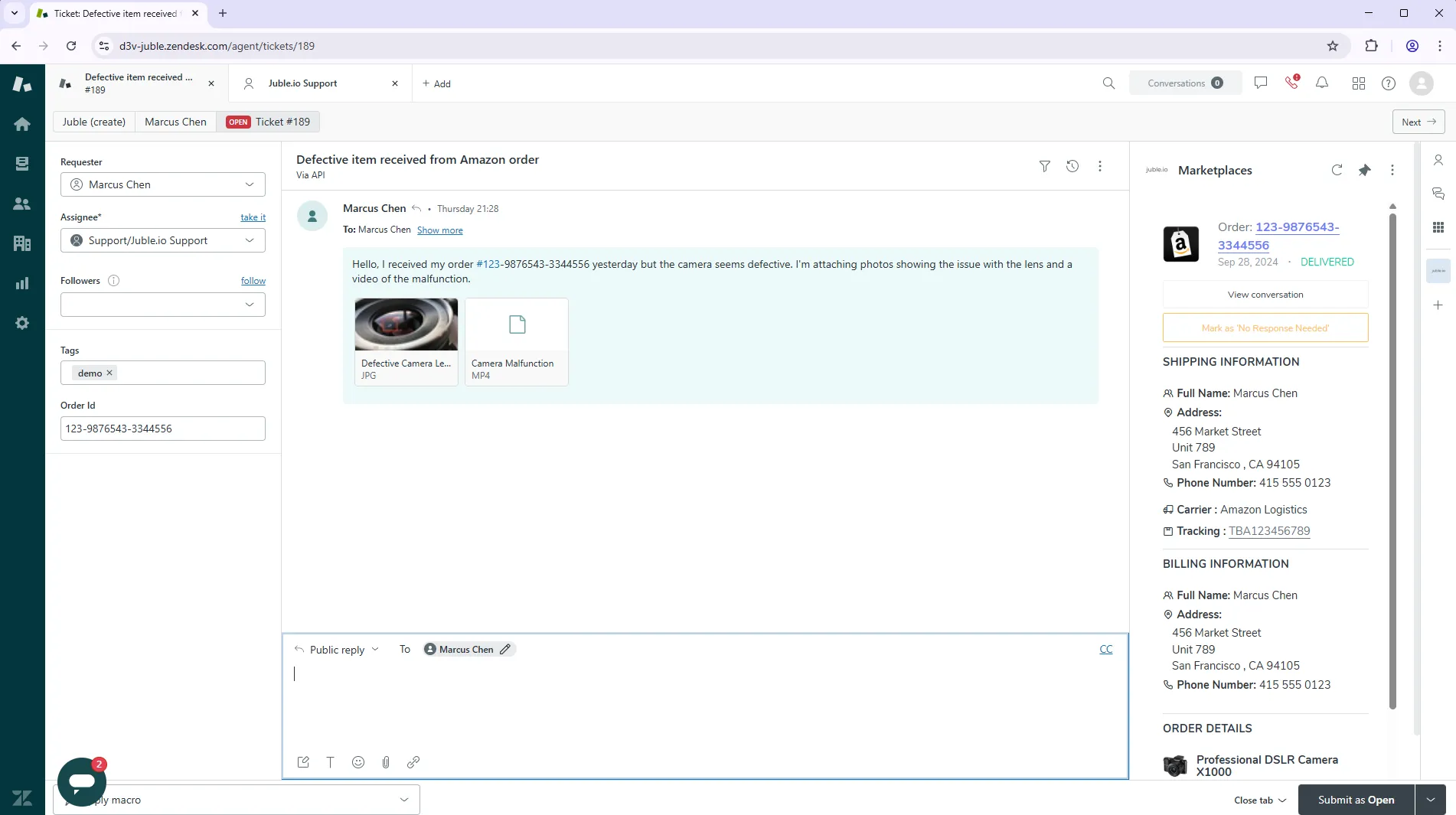
Marketplace data, perfectly organized inside Zendesk
Every marketplace message comes with a payload of useful data — order ID, shipping carrier, tracking number, marketplace name, order status. Juble.io maps all of it directly to your Zendesk ticket fields and custom tags, so your automations, SLA rules, and views work exactly as intended from day one.
Get started for free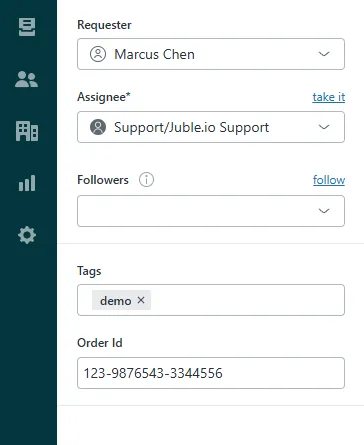
Smarter workflows, faster replies, happier customers
Everything you need for seamless marketplace support in Zendesk — built for support teams that take SLAs seriously and can't afford to miss a marketplace message.
Fast Setup
Connect your marketplace accounts and Zendesk in minutes. Our guided onboarding walks you through every step — no developer or technical skills required.
- Connect in under 5 minutes
- Guided step-by-step onboarding
- No code or API knowledge needed
- Instant data sync on first connection
Fully Synced
Every message, order update, and customer interaction flows automatically into Zendesk — keeping your agents informed, your SLAs green, and your customers happy.
- Unified inbox for all marketplace conversations
- Support for attachments, returns, and tracking updates
- Full order and customer data mapped to Zendesk ticket fields
- Custom tags and triggers based on marketplace and order status
- Real-time syncing so agents always have current information
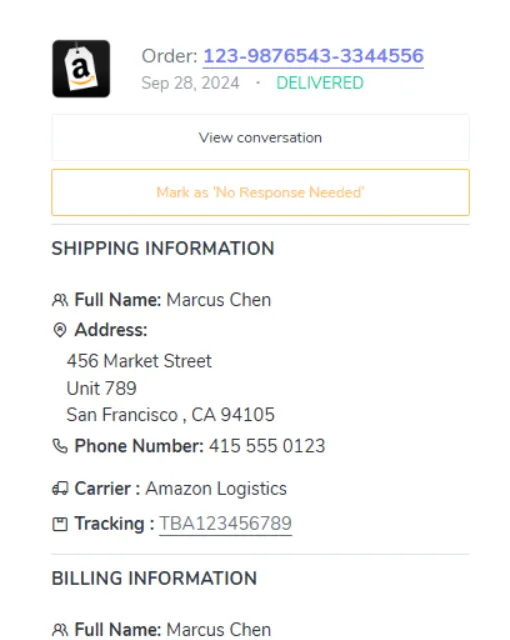
Full order context, right inside Zendesk
Your agents no longer need to leave Zendesk to look up order details. Juble.io surfaces a rich sidebar panel with everything they need — customer info, order status, tracking, and marketplace details — so they can respond with confidence on the first reply.
- Order status, tracking number & shipping carrier
- Customer purchase history across all marketplaces
- Marketplace-specific fields mapped to your workflow
- Quick links to open the order on the marketplace
Questions About Zendesk Marketplace Integration?
Everything you need to know about connecting Amazon, eBay, Etsy, Mirakl, Cdiscount, and other marketplaces to Zendesk.
Why connect my marketplaces to Zendesk?
Zendesk excels at managing high-volume ticket queues, automations, and SLA tracking. Adding Juble.io brings all your marketplace conversations — Amazon, eBay, Mirakl, Cdiscount, and more — directly into Zendesk, so your team can use triggers, macros, and reporting without any manual copy-paste.
What marketplace data is available inside Zendesk?
Juble.io maps order ID, marketplace name, order status, shipping carrier, tracking number, and customer details into your Zendesk ticket fields. You can then use these fields in automations, SLA policies, and custom views.
What marketplaces does Juble.io support?
Juble.io supports Amazon, eBay, Etsy, Walmart, Mirakl, Cdiscount, Fnac / Darty, Miravia, Newegg, TikTok, and more. New marketplaces are added regularly.
How long does the setup take?
Most teams are up and running in under 5 minutes. Our guided onboarding walks you through connecting your marketplace accounts and authorizing the Zendesk integration — no developer needed.
Ready to supercharge your customer support?
Seamlessly manage support across marketplaces and helpdesks — with all the tools your team needs to move fast.